Sunday, February 23, 2020

6 pin PCIE to XT60 Adapter

Since I am going to college soon, but I'm not planning to bring my solar battery box, I will need a different way to power my computer speakers. They use about 24 Watts at max volume. My dad suggested using an AC adapter, but I don't have one of that level. Buying one would be too expensive. I was inspired to use my computer power supply because I have seen that arcade games do the same thing. Arcade games usually have Molex connectors- lots of them. I do not have any Molex connectors on my power supply but I do have a spare 6 pin PCIE connector. So I made an adapter to power my speakers from my computer power supply. That is a 6 pin PCIE to XT60 adapter.

Monday, February 17, 2020

Layered Resin Necklace

I made this colorful layered resin necklace for a friend.
I mixed EasyCast resin and hardener with small amounts of laser printer toner. The colored toner powder was from an old color laser printer that a neighbor gave me to take apart.
I tested two or three batches of resin before the final design. The first test was single color batches to see how long it took to be firm enough to add a hook or to unmold. The single color tests turned out perfect, even though I didn't follow the directions exactly. I was supposed to mix the resin in one container, remix in a 2nd container, and then pour into the mold. I used small plastic hotel shampoo bottles for the molds.
The second test batch was with two color layers. I poured the blue layer first, waited a few hours, and then poured the yellow layer. Unfortunately, I didn't wait long enough and the yellow(now green)  layer sank to the bottom while the blue layer rose to the top.
Based on these results, for the final version I waited at least 8 hours for each layer to set.

Saturday, February 1, 2020

Big Air Pressure Gauge

I bought a giant air pressure gauge at a garage sale. I bought it because it looked cool, but I didn't know what units it was. It turned out to be standard psi. I removed the faceplate and cleaned the glass, but I chose to leave the rust on the case.
I had to buy a splitter from the air tool section of Lowes because they were out of stock in the plumbing section.  This one turned out to be better because it had 2 female ends and 1 male end. I have the main air flow going through the straight section and the gauge on the side with the male thread. I used a small hose because the air flow requirement of the gauge is zero.
 I mounted the gauge to a shelf in the garage next to the air compressor. Now I can see it while standing at my workbench.
I used a piece of Betaduct to hide the excess hose. The Betaduct, which is a UK brand of control panel trunking, was recycled from an old AV cart I took apart at work.

Saturday, January 25, 2020

Monitor Stand


In a previous project, I made a stand for my computer speakers. The speakers are mounted to wood, with a white base that matches the desk. Then the monitor stand would sit on top of the white base. This was nice but took up too much desk depth and made it hard to do homework.

I thought about mounting the monitor on the wall, but I didn't want to make holes in my green screen wall. So I decided to add a metal mesh panel to the back of the speaker stand. I don't know what the mesh was originally designed for because I rescued it from a neighbor's trash. I used a cordless jigsaw with a blade designed for cutting steel. (Worx Axis, Amazon Affiliate link: https://amzn.to/2TY1rmm) 

I had to drill or enlarge holes in the mesh for the speaker bolts, speaker wires, monitor screws, and power cord. I also had to cut a slot for the monitor cables. Then I used Harbor Freight pink grinding wheels with a rotary tool to smooth and deburr the cut edges. They did the job but wore out way too fast.

My dad was skeptical at first and refused to help. But after I finished he agreed that it looked good. It looks almost as good as wall mounting, but it's even better because I can move it anywhere with the desk, and run the cables behind the mesh.

Sunday, December 1, 2019

Keurig Switch Mod

I recently bought a Keurig for $5 at Goodwill. I wanted to see how the design of it compares to my robotic tea maker.
It takes a while for the water to preheat. That uses 1.3 kilowatts for a total (48 watt hours) to get up to temperature, and then about 500 watts periodically to maintain. But even after pressing the off button, it still uses 6 watts due to the iron core transformer for the control circuitry.
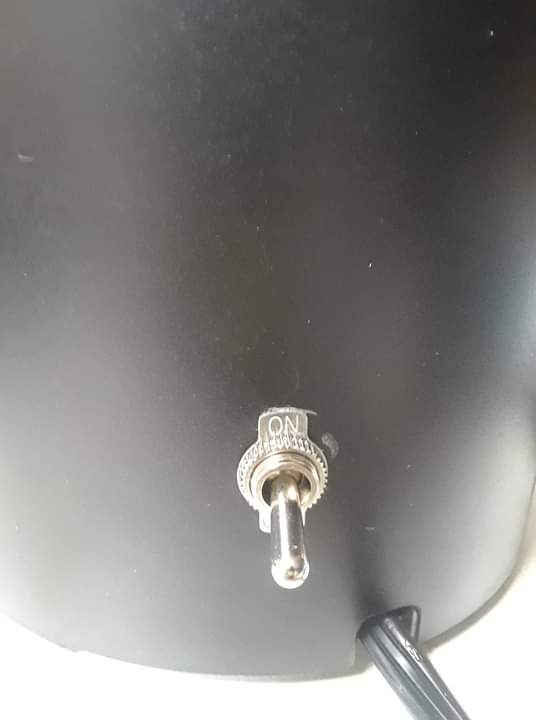
To prevent the constant 6 watts, without having to unplug it all the time, I added an extra switch. This modification makes it possible to turn it all the way off without unplugging it each time.

Thursday, November 28, 2019

Teabot Upgrades

My teabot was only able to remove teabags after 3 and a half minutes, but sometimes I make tea that brews longer. So I decided to add a switch to allow for the removal of the teabag at an adjustable time. The switch determines which GPIO pin, if any, is connected to the motor. If pin 9 or pin 13 is connected to the servo, then it will remove the teabag at 3 and a half minutes or 5 minutes, respectively.
I also replaced the front panel, which was made of a very thin clear plastic, with a half inch thick acrylic panel that I got from my great uncle Mike.
There were also electrical issues. The lift motor was just barely working on the 5 volt output from the Arduino. The minimum voltage for the motor was 4.8. Sometimes it would cause electrical issues such as boot looping. So I added an LM7806 to the power board so I could run the motor off 6 volts, which is right in the middle of the voltage range.
When I reinstalled the power board, there was a short circuit between one of the inputs and the positive unregulated rail, this caused the transformer to dissipate over 100 watts and overheat, so I added a dual fuse holder, with 1 amp fuses. It would also reboot at the end of the cycle  (and start pouring the water over again), so I added an ac capacitor in parallel with the contactor

clear panel and new switch


Fuse holders

Sunday, September 29, 2019

Large Alarm Bell

I bought this large alarm bell for 5 dollars at a Habitat for Humanity Restore. I modified it by bypassing the mechanical oscillator, to make it ring only once per press of the button. I used a MOSFET to drive the bell because the bell was too powerful to be controlled directly. I used it to replace the buzzer in my solar power/ dinner bell system. I needed it to ring only once so my dad couldn't be annoying and hold the button down too long. Also, it could have been so loud that the neighbors might think it was a fire alarm. Its original purpose was to be a security alarm. I thought it would be cool to have a 7 inch diameter alarm bell.


Saturday, August 17, 2019

Power Meter Kit

I wanted to see how much power different devices used and what the power factor was. Power factor is how synchronized the current and voltage are. A power factor of 1 is perfect, close to 0 is really bad. A device that pulls 1 Amp and 60 Watts at 120V will have a power factor of .5, because the real power (Watts) is half the apparent power (VoltAmps).
I have some smart plugs that claim to measure Watts- but actually measure VoltAmps. Sometimes their measurements were 25 times higher than it really was because the power factor was .03. They would say a device used 50 Watts, but was actually only using 2 Watts (and 50 VoltAmps). Other meters such as the KillAWatt 4400 measured things more accurately but only displayed one thing at a time.
I decided to buy a panel mount power meter instead of a self contained one, and add my own case and cord. The one I ordered came quickly through Amazon, and I hoped it would be a quick project. Unfortunately, cutting the opening in the metal case was more difficult than I expected. I used a cordless jigsaw, which is not the most accurate. Eventually, I did get the meter to fit, and then added a 14 gauge cord. For now, I added a colored tape wrap on the case. Maybe I will find some spray paint for metal and redo it.
After I set up the meter, I tried it out on some home electronics.
Laptop- 30 Watts with a power factor of .5
TV- 120 Watts with a power factor greater than .9
Bench supply- 8 Watts with a power factor of .6
1.5 Amp phone charger- 8 Watts with a power factor of .6

This meter can measure up to 100 Amps but the plugs in our house can only supply 15. It can measure up to 260 Volts, but 120 Volts is the highest I can plug it into because of the limits of the US power system.


Sunday, August 11, 2019

2-channel computer speaker system (solar power part 4)

I found speakers that attached to the side of an old TV. They could be used with individual stands or bolted to the side of the TV. The amplifier inside the TV failed, but the speakers were fine. They sounded better than my previous computer speakers, and could be powered from my solar power system. So I decided to swap them out, and build a wooden stand to hold them. I used scrap wood from IKEA furniture that matched my desk surface, and old fence boards for the uprights.

 I also mounted a switch and an amplifier on the speaker stand.
The new speakers with stand are better because they take up less desk space, sound better, and use solar power.


Saturday, August 3, 2019

Recycled Soap #5

After our annual summer vacation family road trip, I ended up with a whole bunch of tiny hotel bars of soap. I decided to combine them with a few from previous years that I had tinted, to make a larger ball of soap that would be easier to use. I used the same process as the previous batches. I shaved them into curls, chips and powder depending on the properties of each bar of soap. Some were ductile and some were brittle. I used a knife that I sharpened with a sharpening stone I bought on the trip.
I added water to make the bits stick together, shaped it into a ball, and set it aside to dry. I am interested to find out how much weight is lost as the water evaporates. The ball of soap is 7 degrees F below room temperature, which suggests that water is currently evaporating.